Business Broadband
Hathway has several services that suit the requirements of different clients.
-
Fiber Internet
Services
-
Multi Office
Connectivity
-

Dedicated Fiber Internet Connection
Dedicated fiber Internet services: Most suitable for MNCs, BPOs, Call Centers, Telcos and other organizations running latency sensitive applications.
-

Gold (SME PLANS) Connection
Contended (1:1) dedicated Internet broadband services: Most Suitable for MNCs, Large Corporates, Software Companies etc.
-

Documents to be submitted along with CRF
-

Photo ID Proof
-

Address Proof
-

Passport size photo
-
-

CPE(Modem Rental) charges applicable on select plans.
-

Download speed indicated is only up to our ISP node.
-

Speed and Data usage limit subject to Hathway's Fair Usage Policy
-

Please contact your nearest Hathway branch offices for area specific plans/schemes & SME / Corporate Services.
-

Installation charges and taxes extra as applicable.
-

Some plans/schemes are available in select areas only.
- ●Team collaboration
- ●Customer communication
- ●Cloud applications
- ●Business software
- ●File transfers
- ●Online transactions
- ●Video conferencing
- ●Multiple simultaneous users
- ●Team communication
- ●Cloud platforms
- ●CRM systems
- ●Video meetings
- ●Appointment management
- ●Patient records
- ●Video consultations
- ●Internal communication
- ●Client meetings
- ●Document management
- ●Cloud-based software
- ●Secure collaboration
- ●Billing systems
- ●Inventory management
- ●Online orders
- ●Customer communication
- ●Multiple departments
- ●High-volume communication
- ●Shared cloud environments
- ●Continuous operations
- ●Interrupted client meetings
- ●Slow cloud applications
- ●Delayed transactions
- ●Reduced employee productivity
- ●Communication disruptions
- ●Customer service delays
- ●Cloud-based applications
- ●Online meetings
- ●Team collaboration
- ●Customer support
- ●Digital payments
- ●ERP and CRM systems
- ●Data sharing
- ●Business communication
Business Broadband Connection for Growing Businesses
Which Business Internet Connection Should You Choose?
What Internet Speed Does Your Business Need?
| Business Type | Recommended Speed |
|---|---|
| Small Office (1-10 Employees) | 100–150 Mbps |
| Clinics & Professional Practices | 150 Mbps |
| Retail Stores & Showrooms | 150 Mbps |
| CA, Legal & Consulting Firms | 150–200 Mbps |
| Schools & Training Centres | 200 Mbps |
| Multi-Team Offices | 200–300 Mbps |
| Enterprises & Large Operations | 300 Mbps+ |
Is Business Broadband Different from Home Broadband?
Best Internet Plans by Business Type
For Startups & Small Offices
For Clinics & Healthcare Practices
For CA Firms, Consultants & Professional Services
For Retail Stores & Multi-Location Businesses
How to Choose the Right Business Broadband Provider
Reliability
Business Support
Scalability
Network Stability
Coverage
Long-Term Value
Common Business Challenges Caused by Poor Internet Connectivity
Why Reliable Connectivity Matters for Modern Businesses
Business Broadband Plans
| Plan Name | Speed | Suitable For |
|---|---|---|
| Starter Business Plan | 100 Mbps | Small Offices |
| Professional Plan | 150 Mbps | Clinics, Consultants, SMEs |
| Growth Plan | 200 Mbps | Growing Teams |
| Business Plus Plan | 300 Mbps | Large Offices |
| Enterprise Plan | Custom | Enterprise Requirements |
Frequently Asked Questions
Which broadband plan is suitable for a small business?
What internet speed is suitable for offices?
Is business broadband different from home broadband?
Which internet connection is suitable for clinics?
What should businesses consider before choosing an internet provider?
Which broadband plan is suitable for startups?
How important is internet reliability for businesses?
Can business broadband support multiple teams?
When should a business upgrade its internet plan?
Which businesses benefit most from high-speed broadband?
Why choose Hathway Business Broadband?
-

Internet access ports
Capacity range starts from 256 Kbps through multiples of STMs Complete Service implementation on OFC network.
-

Static IP addresses
Which can be used for the applications like Internet Servers (Web Servers, Mail Servers, FTP Server, etc).
-

Unlimited Access
Provide cost-effective Internet access to a large number of corporate users.
-

24x7 dedicated support
Services and supported with SLA.
-

Fully integrated Services
High level systems designed enabling the best services to offer
-

Instant connectivity
Capacity range starts from 256 Kbps through multiples of STMs Complete Service implementation on OFC network.
-

Affordable high bandwidth
Capacity range starts from 256 Kbps through multiples of STMs Complete Service implementation on OFC network.
-

Choice set
High level systems designed enabling the best services to offer
-

Capability
Services and supported with SLA
-

Service level
Backed by Covad service level agreements for installation, repair and network performance.
-

Best skill sets
to manage your service round the clock, which are certified by Cisco/Sun/Veritas etc.
-

End to end services
Our service offering is backed by the industry’s best SLA, delivering end to end services on fiber from our internet backbone at the US.
-

Network Operations Center
Our Network Operations Center @ Mumbai- Kamala Mills is benchmarked in the industry; with state of art redundant network gear from Cisco/Extreme the world's best technology and support in India
Business Broadband FAQs
View all WHY ACCOUNT IS NOT ACTIVE AFTER MAKING PAYMENT
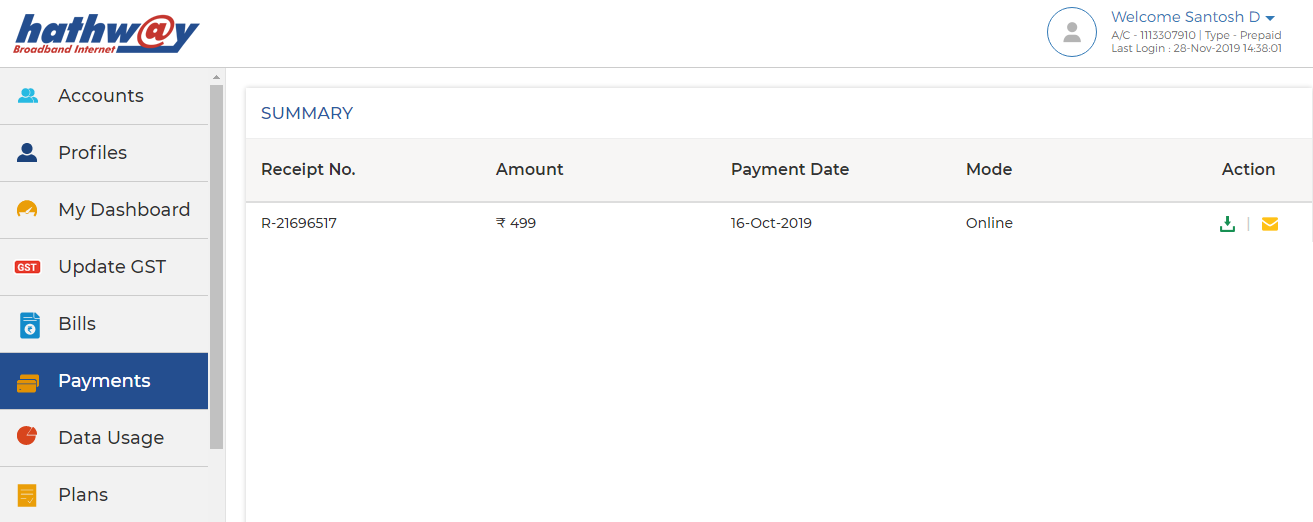
- Log-in to Hathway Self Care Portal on www.hathway.com
- Click on “Payments” tab on the Left Menu Bar .
- Check whether your Payment is reflecting .
- Online Payments usually get updated within 30 mins to 4 hrs. depending on the Bank / Payment Gateway . Payment thru Cash or Cheque takes 12 hrs. to 24 hrs. to get updated
- If your Payment is not reflecting then wait for the same to be updated
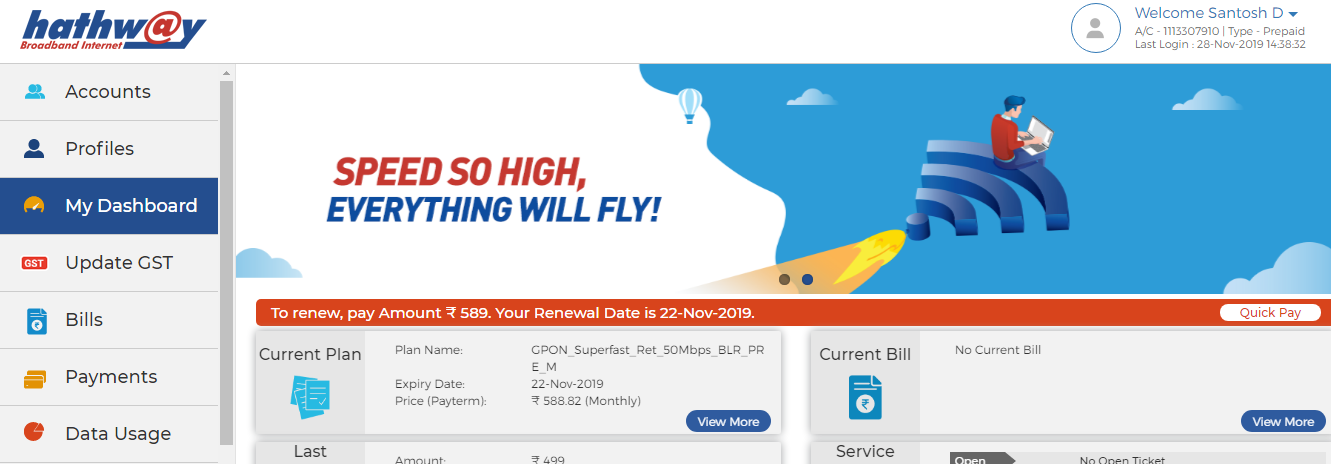
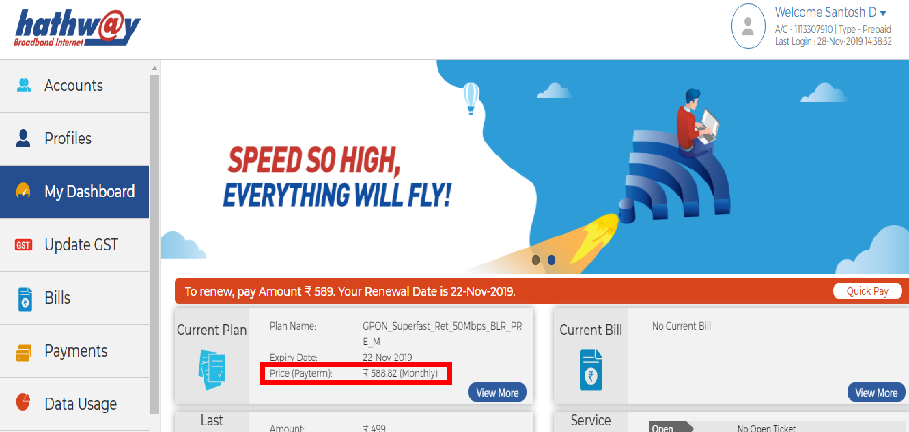
- If your Payment is updated then go to “My Dashboard” on the Left Menu Bar .
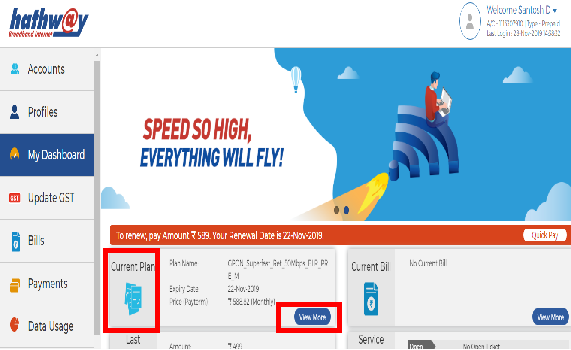
- Check the Renewal Amount under “ Current Plan”.
- If the amount you have paid is same as your Renewal Amount , your account will get auto activated within 30 mins.
- If the amount paid by you is different you may need to pay the differential amount to get your account activated
 HOW TO CHECK MY RENEWAL DATE AND AMOUNT
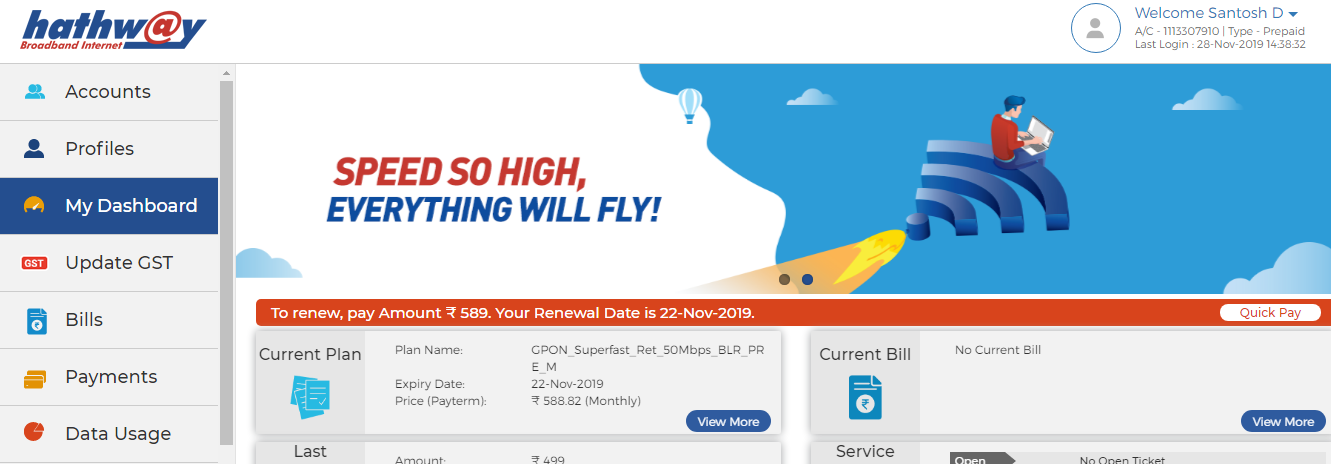
- Log-in to Hathway Self Care Portal on www.hathway.com
- Go to “My Dashboard” in the Left Menu Bar .
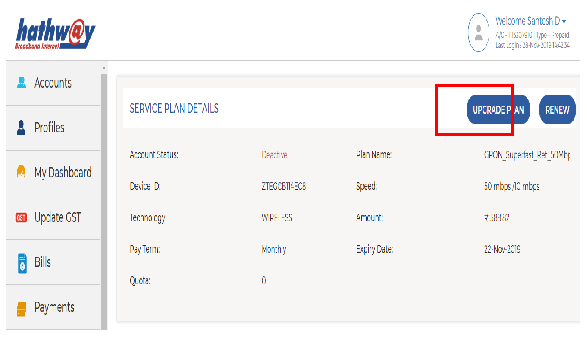
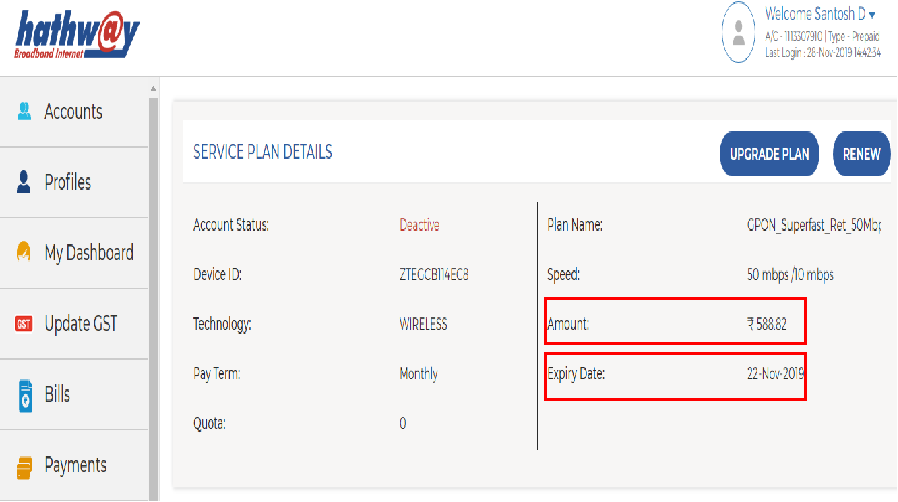
- Click on “View More” under “ Current Plan”
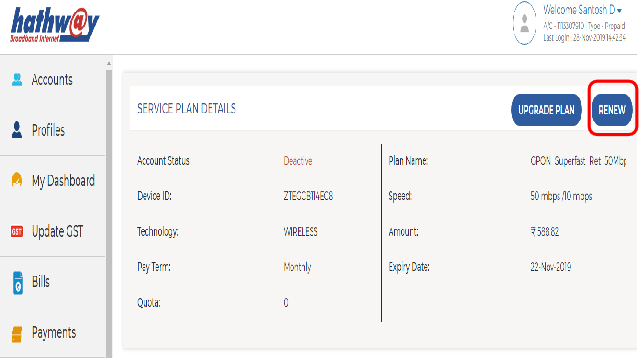
- You will get the Renewal Amount and Your Plan Expiry Date under “SERVICE PLAN DETAILS”
 HOW TO RENEW YOUR PLAN ONLINE
- Log-in to Hathway Self Care Portal on www.hathway.com
- Go to “My Dashboard” in the Left Menu Bar .
- Click on “View More” under “ Current Plan
- Click on “RENEW” option on the Top left hand corner
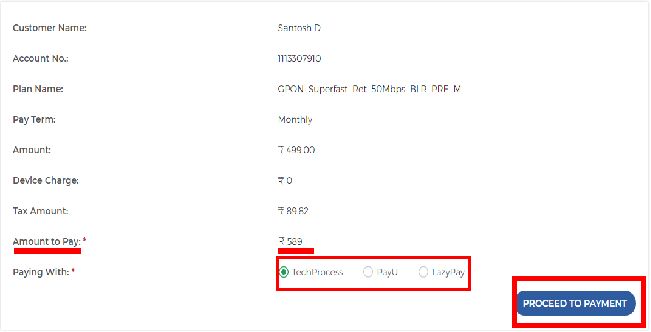
- Check the Total Renewal Amount .
- Select your preferred Payment Gateway.
- Click on “PROCEED TO PAYMENT”
- You will be redirected to the Payment Page.
 HOW TO UPGRADE YOUR RENEWAL PLAN
- Log-in to Hathway Self Care Portal on www.hathway.com
- Go to “My Dashboard” in the Left Menu Bar .
- Click on “View More” under “ Current Plan
- Click on “UPGRADE” option on the Top left hand corner
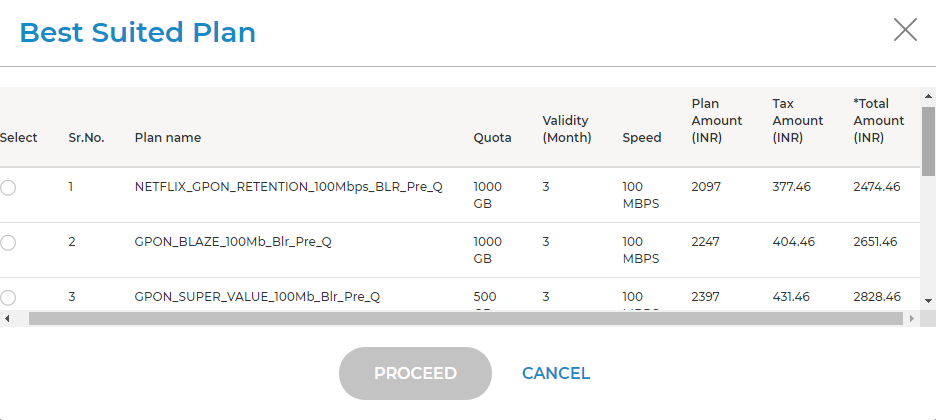
- You will get the Best Suited Plan towards upgrading your Account .
- Select your preferred plan and click on Proceed.
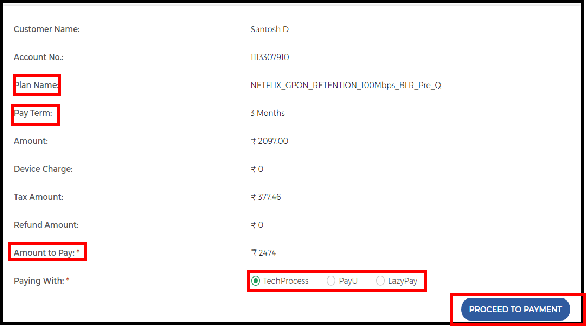
- Check the Total Renewal Amount
- Select your preferred Payment Gateway.
- Click on “PROCEED TO PAYMENT”
- You will be redirected to the Payment Page.